
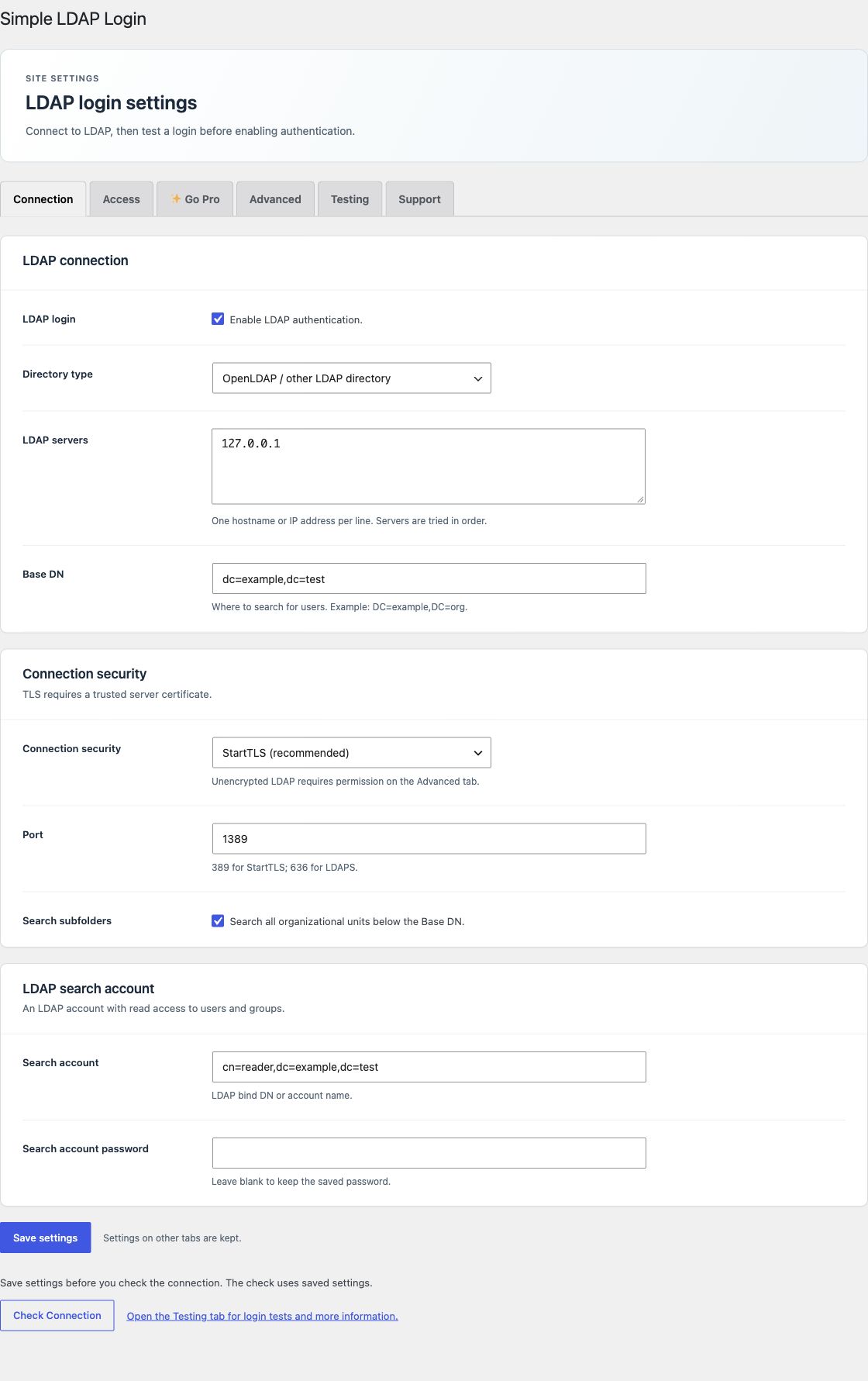
Open the Connection tab. Keep LDAP login off until your tests pass. Save changes before you run a test.
LDAP connection
| Setting | What to enter |
|---|---|
| LDAP login | Enable LDAP password authentication after setup and tests. |
| Directory type | Select Active Directory or OpenLDAP / other LDAP directory. |
| LDAP servers | Enter one hostname or IP address per line. Servers are tried in order. Free uses only the first server; backup servers need Pro or Enterprise. Example: dc1.example.org. |
| Base DN | Set the part of the directory that contains your users. Example: DC=example,DC=org. |
| Username suffix | For AD names without a domain, add a suffix such as @example.org. |
| Windows domain | For AD, enter the short domain name, such as EXAMPLE. This takes priority over the username suffix. |
AD accepts an account name, a UPN such as [email protected], or a domain name such as EXAMPLE\alex. A name that already contains a domain does not receive a second suffix. After a verified login, the plugin uses the directory account name if there is no exact WordPress login match.
Connection security
StartTLS is the default. Use port 389 for StartTLS or 636 for LDAPS, unless your directory uses a different port. Set both the transport and port. The plugin requires a trusted TLS certificate. It stops the connection if TLS fails.
Ask your host to install the correct certificate authority for PHP. The plugin has no setting to disable certificate checks. Unencrypted LDAP needs an explicit choice on Advanced and can send passwords without encryption.
OpenLDAP user searches
Set the Login attribute on Advanced; its default is uid. Without Search subfolders, the plugin builds the user DN from that attribute and the Base DN. Enable Search subfolders when users are in organizational units below the Base DN. That lookup needs a search account or directory access that permits an anonymous search.
LDAP search account
Use an account with read access to the required users and groups. Enter its bind DN or account name and a nonempty password. A search account is required for server SSO and scheduled account jobs. Leave the password field blank on later saves to keep the saved password.
The saved password uses AES-256-GCM encryption. It depends on WordPress salts or SLL_ENCRYPTION_KEY. Keep that key stable. See Advanced settings.
Server failover
Backup servers require an active Pro or Enterprise license. Free uses only the first server, and saved backup addresses are kept. With a paid license, the plugin tries the next server after a connection or search error. It stops after a successful result, an invalid password, or a group denial. Use servers for the same directory and account policy. This is not support for multiple independent directories.
See the illustrated login flow and security boundaries for the complete request path.